Construction Technical SEO: Checklist & Best Practices

Construction technical SEO is the work of making a construction company’s website easy for search engines to crawl, index, and rank. It covers site speed, mobile readiness, crawlability, structured data, and clean site architecture. Get these foundations right and every other marketing effort, from content to paid ads, starts to pay off faster.
Why builders trust our technical SEO help:
Our team brings 190+ combined years of marketing experience and 28 specialists who work across search, web, and analytics. We have designed and tested 500+ landing pages, so we know what makes a site load fast and convert.
Need a hand with construction technical SEO?
Reach out and we will run through your site’s crawl, speed, and structure, then map the fixes that matter most. A focused digital marketing audit is the quickest way to see where you stand.
What Is Construction Technical SEO?
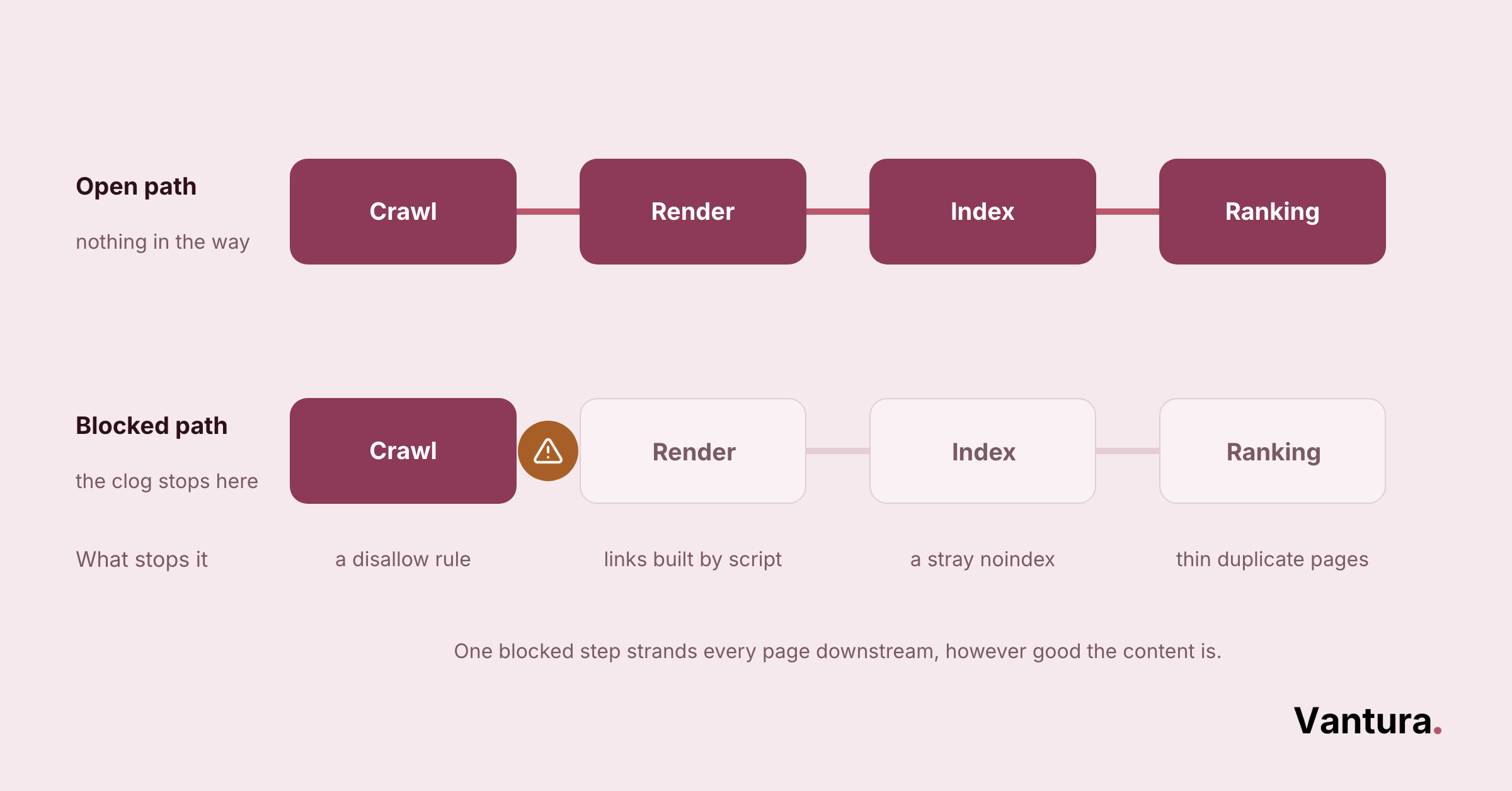
Construction technical SEO is everything behind the scenes that helps search engines find, read, and trust your website. It sits under your content and links, and when it breaks, even great pages struggle to rank.
Think of it as the plumbing of your site. The pipes stay hidden, but a clog anywhere slows the whole system down.
For a busy contractor, that clog usually shows up as pages Google never indexes or a home page that crawls slowly on a phone. Fixing the foundation first is what makes the rest of your construction marketing strategy pay off.
Worth knowing: technical SEO rarely wins rankings on its own, but it removes the roadblocks that hold everything else back. A fast, crawlable site lets your content and reviews do their job, campaign after campaign.
How Do Search Engines Crawl and Index a Construction Website?
Search engines send bots to crawl your pages, follow links, and store what they find in an index. If a bot cannot reach a page or is told to skip it, that page will not show up in search, no matter how good it is.
Crawlability and Indexation
Crawlability is whether a bot can reach your pages. Indexation is whether Google decides to store them.
On the contractor sites we have audited, the most common miss is a strong service page buried four or five clicks deep. The crawler runs low on patience before it ever gets there.
A page can fail to index for a few plain reasons:
- A noindex tag left on by mistake
- A robots block on the whole folder
- Thin content Google chooses to skip
- No internal links pointing to it
XML Sitemaps and Robots.txt
An XML sitemap is a list of the URLs you want indexed. A robots.txt file tells bots which areas to crawl and which to leave alone.
Used together, they steer crawlers toward your money pages and away from clutter. A sitemap that still lists dead URLs sends the wrong signal, so keep it current.
| File or Directive | What It Does | When To Use It |
|---|---|---|
| XML sitemap | Lists your important URLs for crawlers | Every site, updated whenever pages change |
| Robots.txt disallow | Blocks a folder from being crawled | Staging areas, carts, thank-you pages |
| Noindex tag | Keeps a page out of the index | Duplicate or thin pages you still link to |
| Canonical tag | Points to the main version of a page | Near-identical service or location pages |
Orphan Pages and Internal Link Coverage
An orphan page is one with no internal links pointing to it. Bots struggle to find these, and real visitors almost never do.
This gets common on large supplier and multi-service sites, where old project pages get stranded when the navigation changes. Solid internal linking, the same habit that powers good industrial marketing, keeps every page reachable.
On one supplier site we cleaned up, we found a few hundred orphan URLs sitting outside the menu entirely. Reconnecting them was the single biggest crawl win of the project.
Log File Analysis
Server logs show exactly which pages bots visit and how often. Reading them is the clearest way to see where your crawl budget actually goes.
When Log Analysis Earns Its Place
You do not need this on a small brochure site. Once you pass a few thousand URLs, it becomes worth the effort.
Why Does Site Speed Decide Construction SEO Results?
Site speed shapes both rankings and conversions, because Google measures how fast your pages load and stay stable. Slow pages lose visitors before the phone number even appears, and search engines notice that drop.
Google groups speed into three signals called Core Web Vitals. Each one measures a different part of the loading experience.
For a small construction firm on a tight budget, speed is one of the cheapest ranking wins available. It is a core part of lean small business marketing, since it costs mostly effort rather than ad spend.
The headroom here is real. Across the web, only about 21.2 percent of pages pass all of Google’s Core Web Vitals thresholds, according to Ahrefs, so most contractor sites have genuine room to improve.
Quick benchmark: aim to have your key pages interactive in under three seconds on a mid-range phone over a normal connection. That is the point where, in our experience, bounce rates stop climbing.
| Metric | What It Measures | Good Target |
|---|---|---|
| Largest Contentful Paint | How fast the main content loads | Under 2.5 seconds |
| Interaction to Next Paint | How quickly the page responds to a tap | Under 200 milliseconds |
| Cumulative Layout Shift | How much the page jumps while loading | Under 0.1 |
Is Your Construction Site Ready for Mobile-First Indexing?
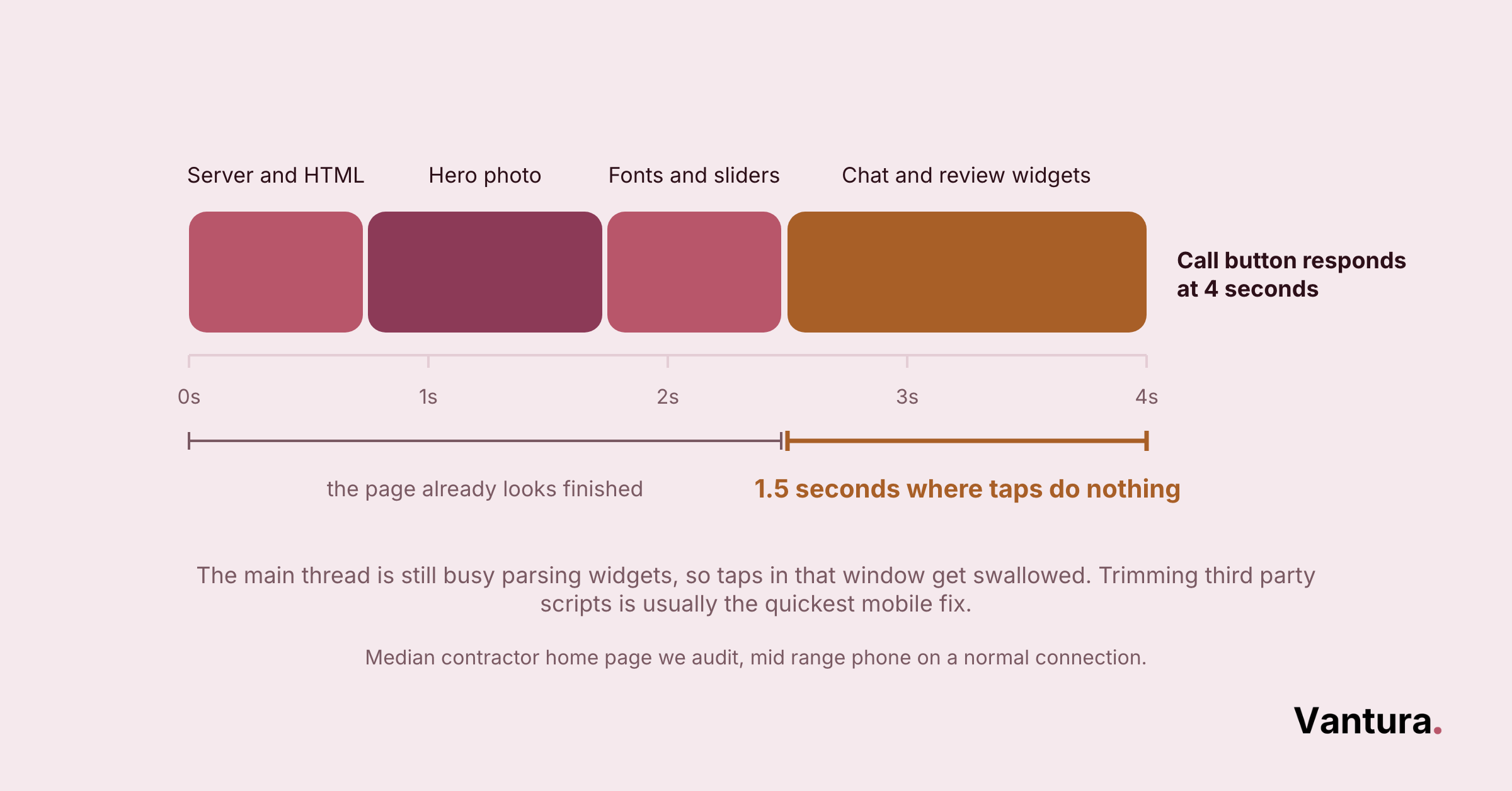
Yes, it has to be, because Google now ranks the mobile version of your site, not the desktop one. If your phone layout hides content or loads slowly, that is the version deciding your rankings.
Most people searching for a contractor are on their phones, often standing in a half-finished kitchen or out on a job site. The whole experience has to work with one thumb.
This hits home-service trades hardest, the same plumbing and electrical firms that lean on plumber marketing to catch urgent, on-the-go searches. A slow mobile page there is a lost job.
Speed matters even more on a phone. More than half of mobile visitors, about 53 percent, leave a site that takes longer than three seconds to load, Google’s research found.
Phone vs Desktop, What Each Version Needs
- Tap targets big enough for a thumb
- Click-to-call number near the top
- Text readable without zooming
- Images sized for small screens
- Same content as the mobile version
- Room for detailed service and project pages
- Wider galleries and comparison tables
- Fast even on office connections
The rule of thumb is simple. Whatever a desktop visitor can see, a phone visitor must see too.
How Should a Construction Website Be Structured for SEO?
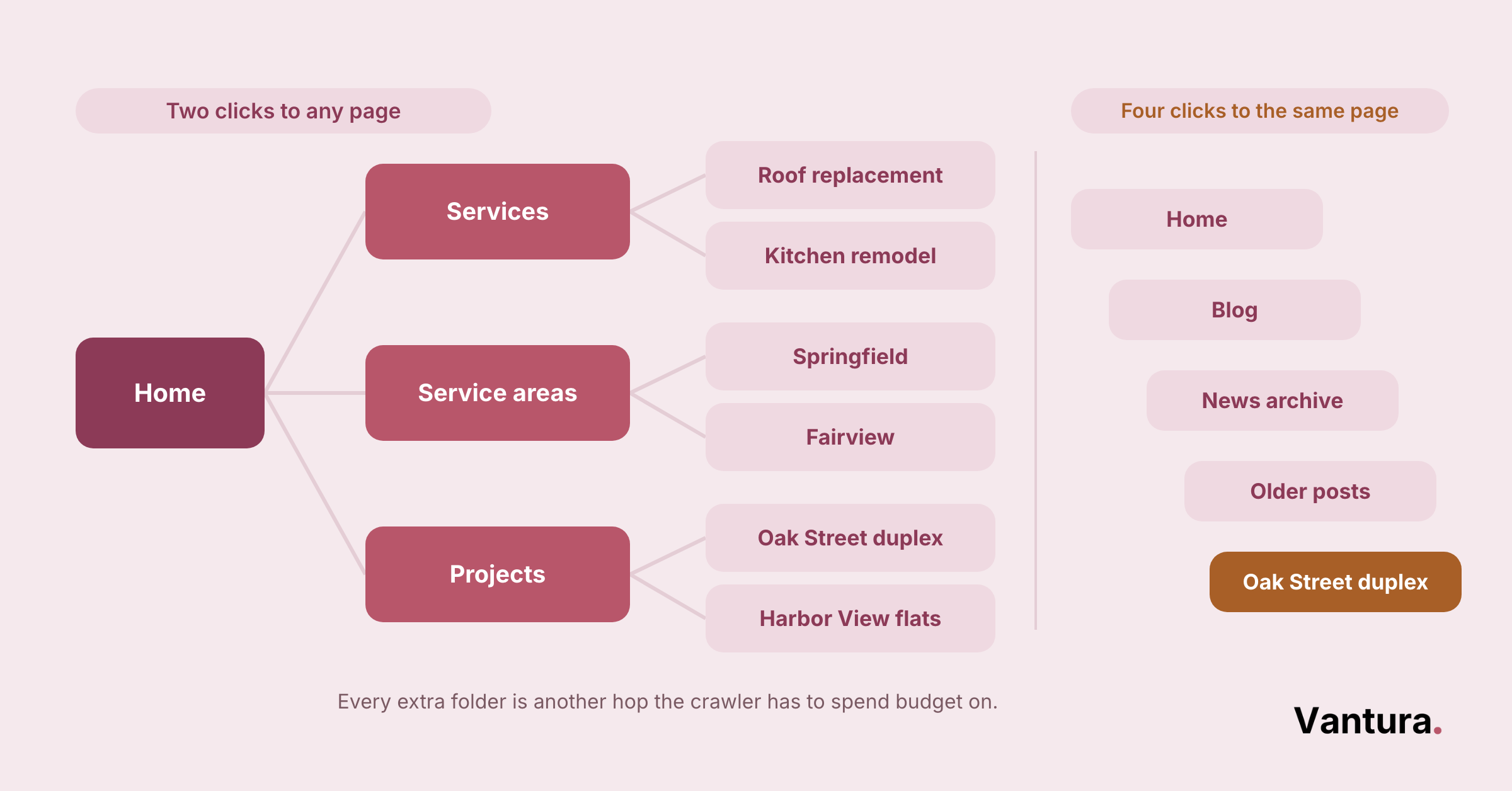
A construction website should use a flat, logical structure where every important page sits within a few clicks of the home page. Clear buckets for services, locations, and projects help both users and crawlers find what they need fast.
Site Architecture and URL Structure
Group pages into clear sections. Services, service areas, and past projects each deserve their own tidy area of the site.
Roofing and remodeling companies often build dozens of service-area pages, which is smart, as long as the URLs stay short and readable. The same structure that supports roofing marketing keeps those pages from turning into a maze.
Clean URL Habits
- Use words, not ID numbers
- Keep folders shallow
- One topic per URL
- Skip stray dates and parameters
Pagination and Infinite Scroll
Big project galleries often split across many pages or load endlessly as you scroll. Both can hide content from crawlers when they are set up carelessly.
The fix is to give every item a real, linkable URL. If a bot cannot reach a project photo through a plain link, it may as well not exist.
Handling Duplicate Content and Redirects on Construction Sites
Duplicate content splits your ranking signals across near-identical pages. Redirects clean up the mess when URLs change.
Canonical Tags and Duplicate Content
Service-area pages are the usual culprit. Twenty towns with almost the same text look like duplicates to Google.
A canonical tag points search engines to the main version you want ranked. Better still, write each location page with genuinely local detail so it earns its own spot.
Redirects and Migration Planning
When you rebrand or move to a new site, every old URL needs a 301 redirect to its closest match. Skipping this step is how contractors quietly lose years of rankings overnight.
We map redirects before launch, not after, which is exactly the kind of planning good marketing consulting covers. On one remodeler’s migration, trimming redirect chains down to a single hop cut load time by roughly a third.
Watch out: redirect chains, where one URL points to another that points to a third, waste crawl budget and slow every hop. Keep each redirect pointing straight to the final page.
Does HTTPS and Site Security Affect Construction SEO?
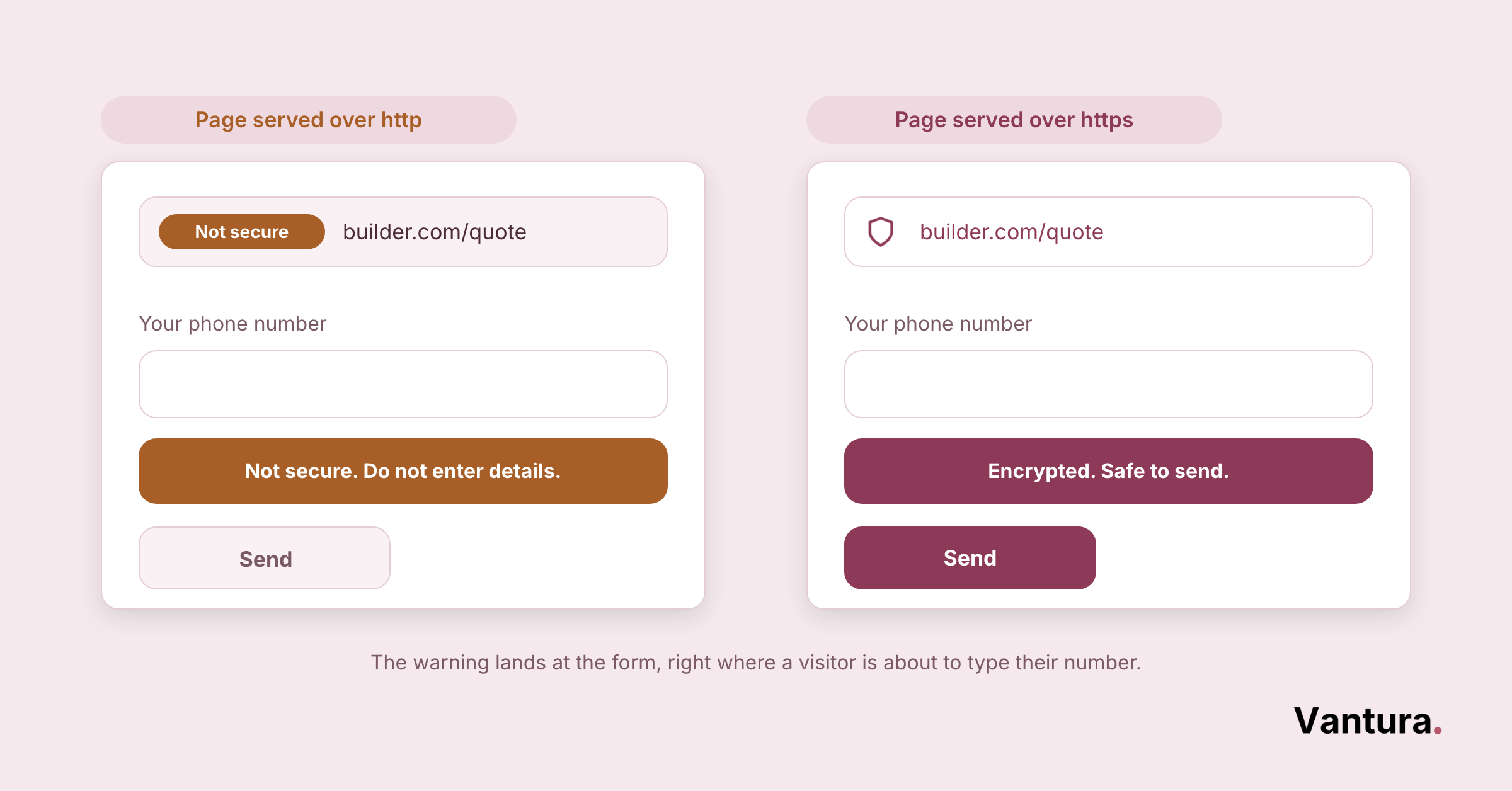
Yes, HTTPS is a confirmed ranking signal, and just as importantly, browsers flag sites without it as not secure. That warning scares off leads before they ever see your work.
Getting an SSL certificate is cheap and often free. There is no good reason for a contractor site to still run on plain HTTP.
- Force HTTPS on every page
- Fix mixed-content warnings
- Renew certificates on time
- Redirect old HTTP URLs
How Does Schema Markup Help Construction Websites Rank?
Schema markup is code that explains your content to search engines in plain terms. It can earn rich results like star ratings, service details, and FAQ snippets that make your listing stand out.
For construction firms, LocalBusiness and Service schema are the workhorses. Product schema matters more for suppliers, the same audiences served by manufacturing marketing.
Schema Types Worth Adding
- LocalBusiness, with your name, address, and hours
- Service, describing each thing you offer
- Review, when you have genuine ratings to show
- FAQ, for common questions on a page
Do not fake reviews or mark up content that is not on the page. Google penalizes schema that misleads.
How Do You Handle JavaScript and Multilingual Construction Sites?
Handle JavaScript by making sure your key content and links load without it, and handle multilingual sites with hreflang tags that tell Google which language version to show. Both problems come down to helping crawlers see the right version of a page.
JavaScript SEO and Rendering
Fancy sliders and filters often rely on JavaScript that crawlers render late or skip entirely. This trips up product-heavy and ecommerce marketing sites the most.
The safe rule is to serve your core content and links in plain HTML. Let JavaScript enhance the page, not build it from nothing.
Hreflang and Multilingual Sites
If you serve Spanish-speaking crews or clients, hreflang tags point each visitor to the right language. Skip them and Google may show the wrong version or treat your translations as duplicates.
Most single-region contractors will never need this. Add it only when you genuinely publish in more than one language.
Keep in mind: most rendering problems disappear the moment your main navigation works with JavaScript turned off. Test that first, before blaming anything more exotic.
The Construction Technical SEO Audit Checklist
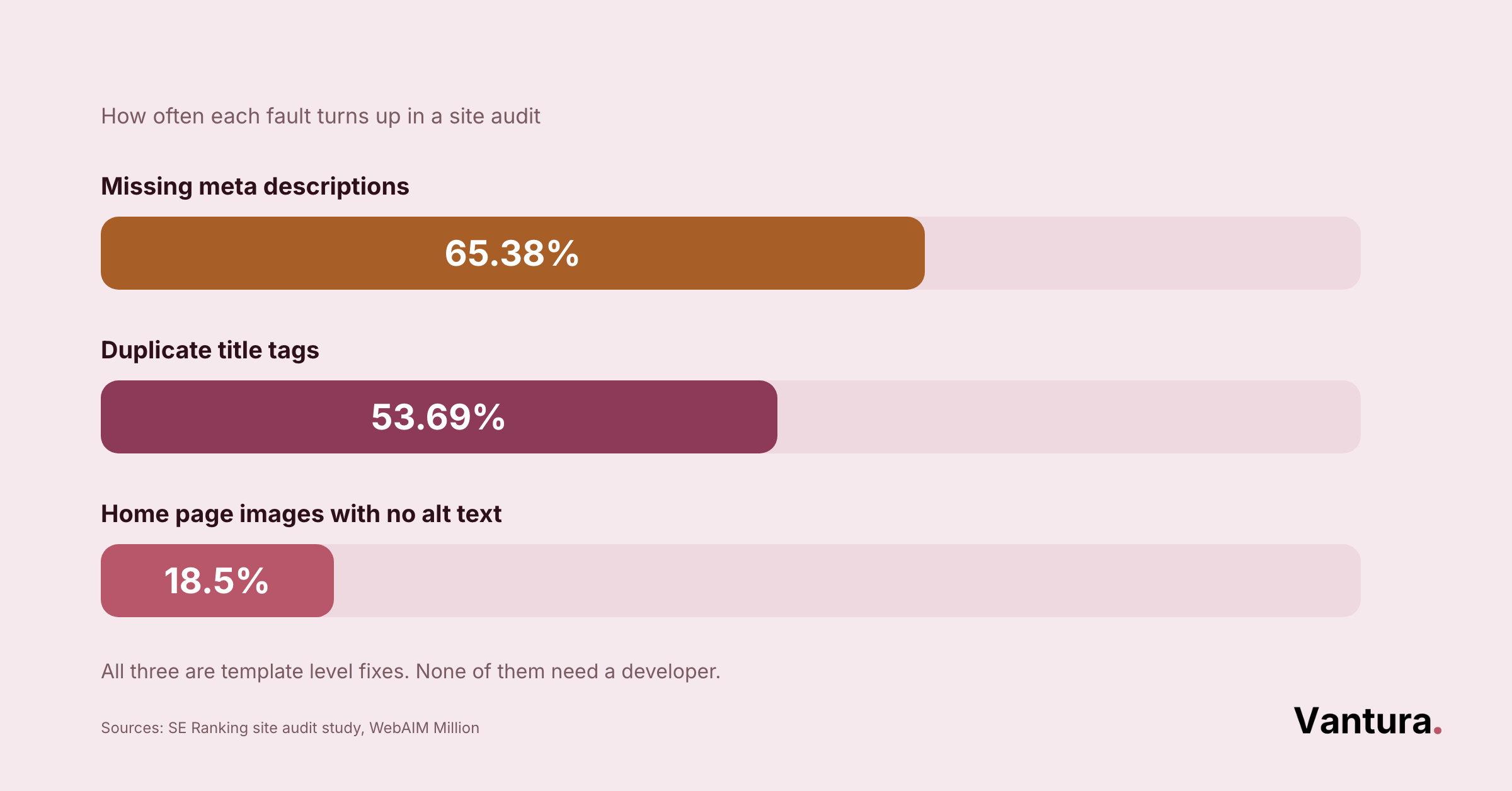
Run this checklist quarterly and after any big site change. It walks from crawling down to structured data, in the order we tackle a new client site.
A crawler like Screaming Frog, plus Google Search Console and PageSpeed Insights, covers most of this at little or no cost. Those three tools catch the majority of what breaks technical SEO.
If your team is stretched thin, this is the kind of work that is easy to outsource your marketing to a technical partner. It runs quietly in the background while your crew stays on the tools.
Technical SEO for Enterprise and Multi-Location Construction Firms
Large builders and national contractors face technical SEO on hard mode. Thousands of pages, multiple locations, and legacy systems all pull against each other, which is where dedicated enterprise marketing support pays off.
Multi-location firms fight duplicate content across near-identical branch pages. Franchise operators feel this most, since every branch page needs its own local detail to avoid looking like a copy of the next.
At this scale, crawl budget, log analysis, and automation stop being optional. Small manual fixes simply cannot keep up with the page count.
Bottom line: the bigger the site, the more small technical gaps multiply. On enterprise builds, we prioritize crawl efficiency and clean templates over chasing individual pages.
How Much Does Technical SEO Affect Construction Rankings?
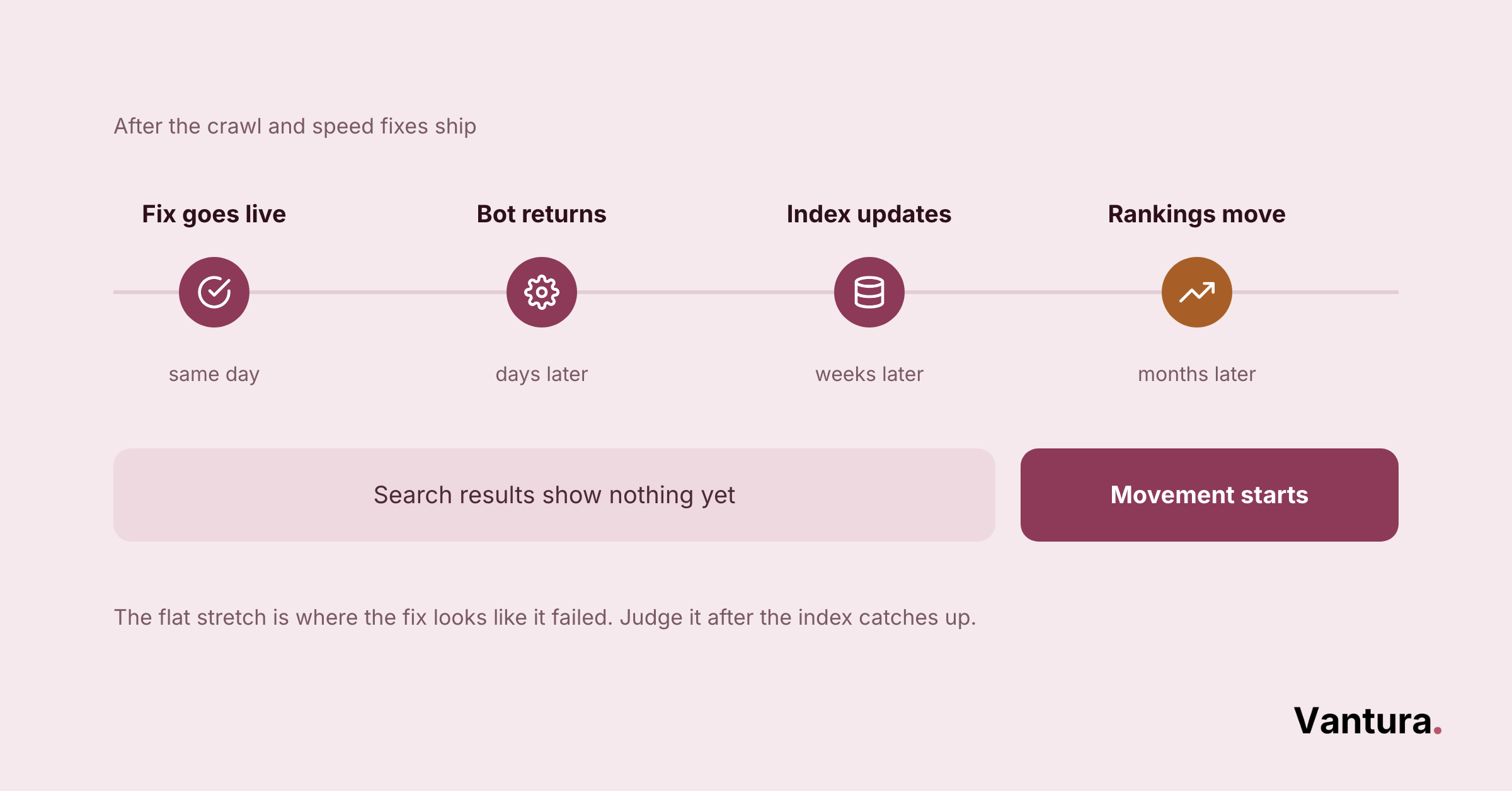
Technical SEO sets the ceiling on how well everything else can perform. It rarely earns the top spot alone, but a broken foundation quietly caps the results of your content, links, and ads.
Treat it as the base layer under your whole plan. When technical health, content, and campaigns line up, results compound, which is the whole point of integrated marketing. The same discipline shows up in a disciplined franchise rollout, where every location page has to pull its own weight.
Across the contractor sites we have cleaned up, the pattern holds. Fix crawl and speed issues first, and the same content that sat on page three often climbs within a couple of months.
Disclaimer: This article is for general information only and does not guarantee specific marketing or search results. Vantura Marketing makes no warranties about outcomes, and readers should apply this guidance at their own discretion.